For allied health and educators
Meet each child with their whole world in view.
You do good work in the time you get. But so much of a child's life happens at home, where you never see it. When a family invites you into their Understanding Zoe village, you finally do.
Free for supporters. The family chooses exactly what you see.
Already use it? Log in

Partnering with









As featured in






The gap you work around
You only ever see one part of the picture.
The home context you rarely get to see.
The strategy that worked at home, that no one passes on.
The notes, scattered across five systems, that you piece together alone.
You shouldn't have to piece it together alone.
What you see
The picture the family shares with you.
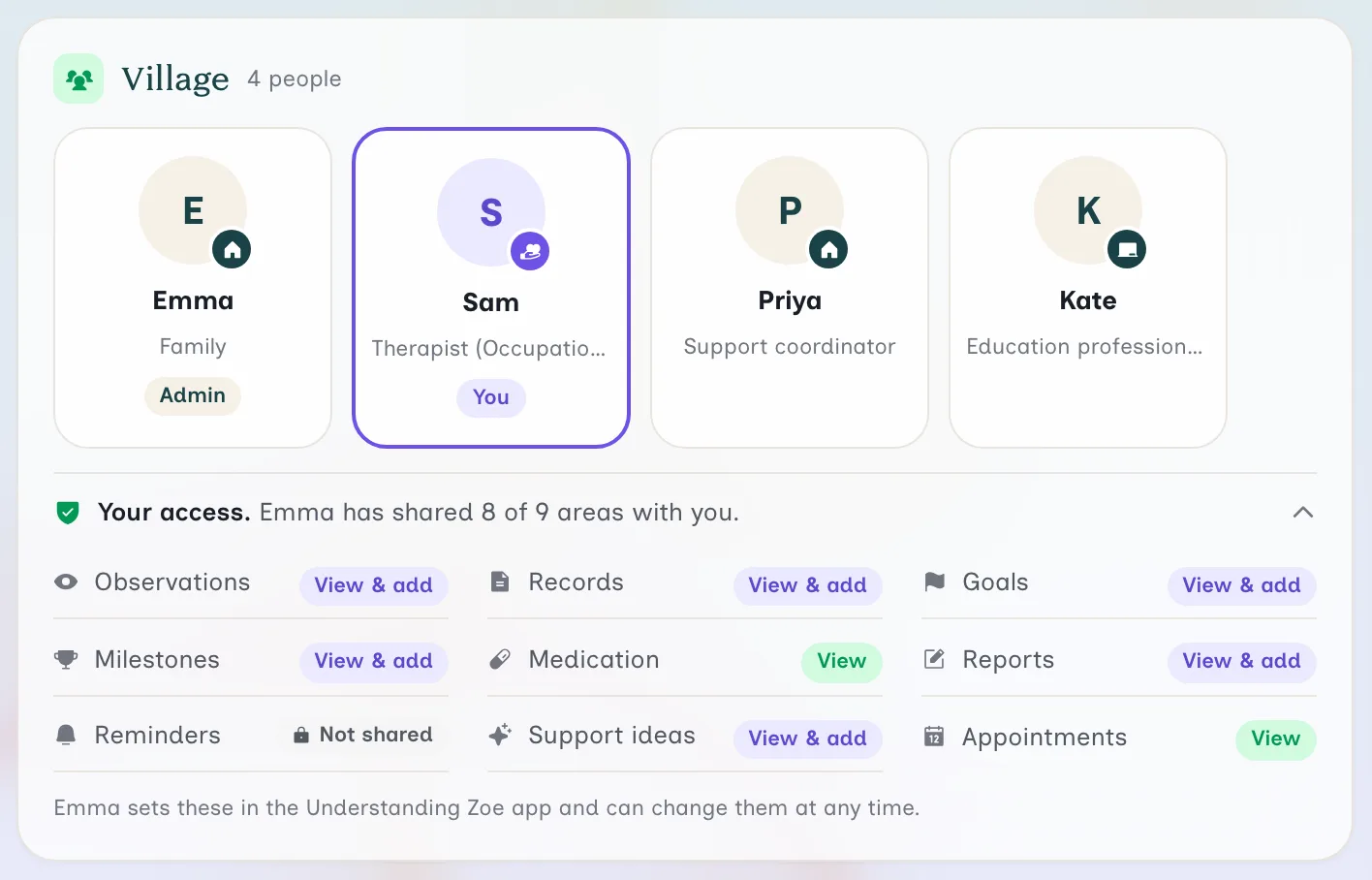
These are Understanding Zoe's web screens, as a therapist or teacher sees them. The family shown is an example, not a real one.
You join the family's village.
A family invites you into their child's village, and it is free for you. You see who else supports the child, and what each person added lately. One line tells you exactly what the family has shared with you.
Today starts with your next session.
The child's Today page opens on your next session. Below it, you see counts for the last 7 days and the last session. You start each session knowing how the week went.
Pip answers from what the family shares.
Pip sits beside the child's page. Ask a question in your own words, or pick a ready-made card. Your Pip chats are private, so the family and the village cannot read them.
Teachers get a classroom view.
Teachers and educators get their own Today page, with no session cards. It shows what changed in the last 7 days. A Limited view note tells you when the family has not shared an area.
Consent, built in
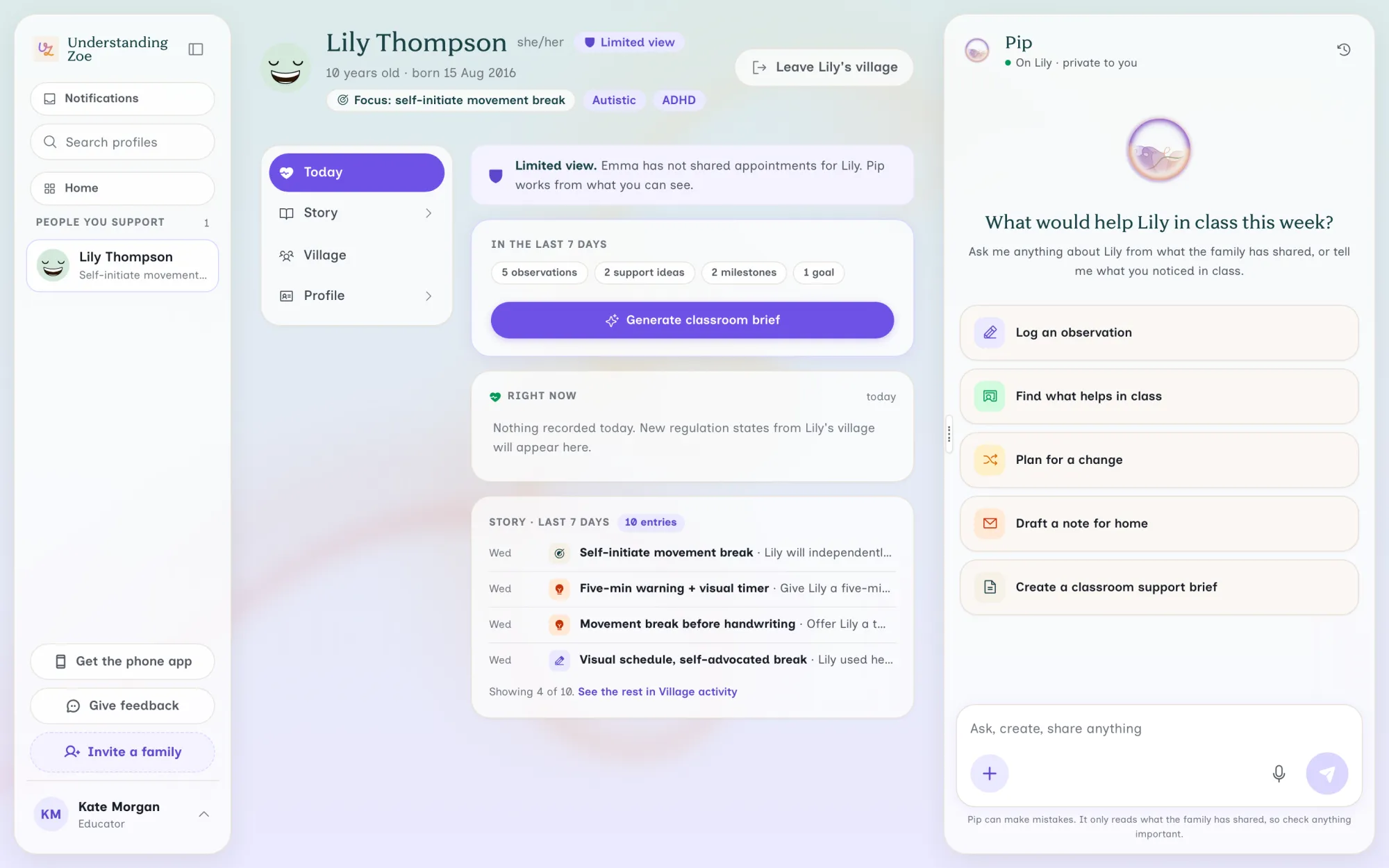
You see only what the family shares.
- The family sets your access in the app, area by area.
- Your access lists all nine areas, so you always know what you hold.
- They can change what you see at any time.
How-to video
See how you join a family's village
You get an invitation by email. Joining is quick and free, on a computer or a phone.
On your computer
Use Understanding Zoe at your desk.
Understanding Zoe on the web runs in a browser on your computer. You sign in with your app account. It is the same account, not a separate one.
For therapists
- Home lists the people you support, with what was added in the last 7 days.
- With full access, tell Pip what you noticed in session and it logs an observation.
- Connect Cliniko, Nookal or Halaxy. A linked client's appointments then arrive on their own.
- Turn on two-factor sign-in for the web if you want a second step.
For teachers and educators
- You are asked for your school or organisation, not a clinic.
- Ask Pip to draft a note for home. Nothing is sent to the family.
- With full access to reports, create a Classroom Support Brief. It uses plain language and names no diagnosis.
You only see what each family or person chose to share with you.
Why it's different
The story carries forward, so you can too.
You never start from scratch. The whole picture carries forward, for the family and for you.
So you can do your best work from the first session.
Understanding Zoe is an app that lets a family invite the allied health professionals and educators who support their child into a shared, private village. Supporters join for free. You see only what the family chooses to share, across nine permission categories. You get the same picture the family sees: an About Me one-pager that introduces the child strengths first, patterns from their daily notes, and context for your next appointment. Pip, the family's pocket coach, helps them prepare, and does not diagnose or treat.
Working in the NDIS? There is a page for support coordinators and one for plan managers.
Trusted where it counts
Built for the way you already work.
As a therapist, to be able to both recommend and utilise this app with families is incredible. Creating space to connect, grow and thrive.
Strengths first, with the family in control of their information.
In any report, observations are attributed by role and date, not by name.
Pip is the family's coach, not a clinical tool. It does not diagnose or treat.
Their information is safe.

- Stored in Australia.
- Encrypted in transit and at rest.
- ISO 27001 certified.
- Aligned with the Australian Privacy Principles.
- Your Pip chats are private by design. Even the account owner can't read a member's Pip chats.

The Australian parenting website. Government funded since 2006.
Where Pip's answers come from
Pip draws on more than 1,200 evidence-based parenting resources from the Raising Children Network to help generate its responses. Where relevant, you can follow links to the original Raising Children Network resources.
At least two independent experts approve each new article for accuracy. A Scientific Advisory Board oversees the content. More than 400 Australian and international experts contribute.
Sourced from © raisingchildren.net.au, reproduced with permission.
In Understanding Zoe's 2025 study of 1,091 Australian families, with Sunday Insights and PureSpectrum. Read the research
Last updated: October 2026
FAQ
Questions practitioners ask
Which devices can I use Understanding Zoe on?
You can use it on a computer, in a web browser, at app.understandingzoe.com. It also runs as an app on iPhone, iPad, and Android phones and tablets. It is the same account everywhere, so everything you add is already there. Reminders and notifications come from the phone app, not the browser.
Is Pip a therapist or a doctor?
No. Pip is not a therapist, a counsellor or a doctor. It helps you organise, notice patterns and prepare. For medical questions, speak with your GP or your prescriber.
Can Pip diagnose me or my child?
No. Pip cannot give a diagnosis. It helps you track what you notice, to take to the right professional.
Does Pip search the open internet?
No. Pip draws on a library we chose and licensed. That includes more than 1,200 evidence-based parenting resources from the Raising Children Network. Pip does not read the open web.
Does Pip ever get things wrong?
Yes. Pip can miss context or misread a pattern. Tell Pip when something is wrong, and it updates what it remembers. Treat its ideas as things to try, never as instructions.
Do the people I invite have to pay?
No. Supporters join for free. Only you hold the subscription, and it covers every profile on your account.
What can a supporter see?
Only what you allow. You set nine categories to None, View or Full for each person. You can also hide a single item from chosen people.
Is anything always shared with a supporter?
Yes, two things. Every supporter can read the profile's About Me. Every supporter can also chat with Pip about the profile.
Can supporters use Understanding Zoe on a computer?
Yes. Therapists, teachers, support coordinators and family members can all sign in on a computer. What each person sees comes from what the profile owner chose.
Do you sell my data?
No. We do not sell your data to anyone, ever.
Is Understanding Zoe ISO 27001 certified?
Understanding Zoe Pty Ltd operates an Information Security Management System certified to ISO/IEC 27001:2022 by Prescient Security. The certificate covers how we manage information security. It is not a certification of the app itself.
More answers are on our help page.
Ready when you are
Join a village, for free.
Supporters never pay. See only what the family or individual shares. Start where the last session finished.
Already use it? Log in